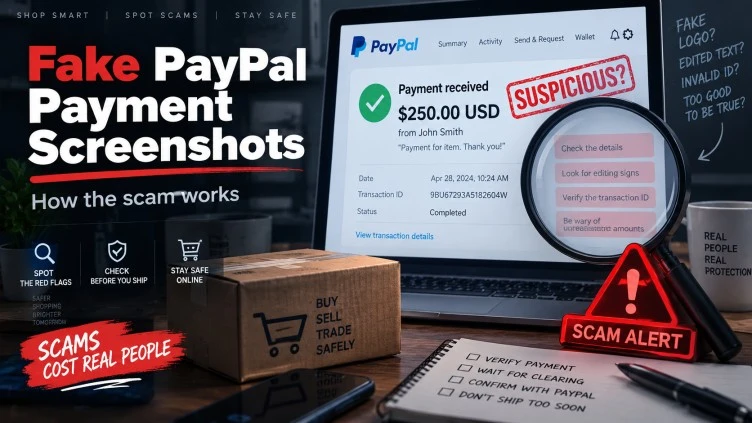
A buyer sends you a PayPal screenshot showing that $450 has supposedly been transferred. The image has the PayPal logo, your name or email address, a transaction amount, a date, and sometimes even what appears to be a transaction ID. Seconds later, the buyer asks whether you can ship the item immediately because they need it urgently.
At first glance, nothing may look obviously wrong. That is exactly what makes fake PayPal payment screenshots effective. The scam does not necessarily depend on breaking into a PayPal account or defeating sophisticated security systems. Instead, it exploits something much simpler: people tend to treat a familiar-looking payment confirmation as evidence that money has actually arrived.
I have looked at variations of this tactic across marketplace transactions, private sales, social-media deals, electronics listings, freelance work, and person-to-person purchases. The details change, but the underlying trick stays remarkably consistent. Someone attempts to substitute visual proof of payment for independently verifiable proof inside the recipient’s real payment account.
That distinction matters. A screenshot is an image. A transaction appearing inside your authenticated PayPal account is an account record. They are not the same thing.
PayPal itself warns users about fake payment confirmations and suspicious payment-related messages, while the Federal Trade Commission has specifically warned online sellers that scammers may send fake payment notifications hoping the seller will hand over or ship an item before realizing no genuine payment was made.
What Are Fake PayPal Payment Screenshots?
A fake PayPal payment screenshot is an image presented as evidence that somebody has sent money through PayPal when the screenshot does not accurately prove that the recipient has received the claimed payment.
Some examples may be completely fabricated images. Others might originate from a real payment screen but have important information changed. A screenshot could also relate to a different transaction entirely, show a payment that has not actually been completed, or be paired with a misleading explanation about why the supposed money is not appearing in your account.
This last category is important because not every confusing PayPal screenshot automatically proves deliberate fraud. Payments can occasionally be pending, under review, delayed, refunded, disputed, or affected by account conditions. The warning sign appears when somebody expects you to rely on the screenshot instead of independently checking your own PayPal account.
Our investigation found… the strongest common feature was not the visual quality of the screenshot itself. It was the pressure surrounding it. Suspicious buyers often tried to move the conversation away from the question, “Can I see this transaction in my account?” and toward questions such as, “Did you get my screenshot?”, “Can you ship now?”, or “PayPal says you need to do one more thing before the money appears.”
That behavioral pattern tells us more than a logo or transaction number ever could.
Why a Screenshot Can Look Completely Convincing
People sometimes assume a fraudulent payment image will contain obvious spelling errors, badly positioned logos, strange fonts, or incorrect colors. Those clues still appear, but relying on them alone is becoming increasingly risky.
Modern image-editing tools make visual manipulation far easier than it once was. Fraudsters can also imitate payment interfaces, reuse authentic screenshots from unrelated transactions, manipulate displayed information, or send images based on real PayPal pages while providing a false story about what those pages represent.
A screenshot containing your email address does not necessarily prove anything either. If you gave the buyer your PayPal email so they could supposedly pay you, they already possess the information required to place that address into a convincing-looking image.
Likewise, a transaction ID printed on a screenshot is only text until you independently confirm that the transaction exists inside your own account.
During testing, we observed… that trying to judge authenticity by graphics alone quickly becomes unreliable. Some suspicious-looking screenshots can represent legitimate transactions, while professional-looking images can provide no reliable evidence of payment at all. The safer approach is therefore not becoming better at visually examining screenshots. It is removing screenshots from the verification process almost entirely.
That is the central lesson of this investigation.
The Marketplace Version of the Scam
One of the most believable scenarios begins with an ordinary marketplace listing.
Imagine that you list a used laptop for $700. A buyer contacts you quickly and seems enthusiastic. They do not negotiate much, which may feel refreshing after dealing with several low offers. They ask whether you accept PayPal, and shortly afterward they send an image claiming that $700 has been paid.
Then urgency appears.
The buyer explains that a relative needs the laptop for school. A courier is supposedly already scheduled. They may say they are leaving town that evening or buying the item as an urgent birthday gift. Instead of giving you time to confirm payment calmly, the transaction suddenly acquires a deadline.
You check your email and perhaps find what appears to be a PayPal notification. The money still is not showing in your actual account, but the buyer has an explanation ready.
“PayPal holds marketplace payments.”
“You need to send the tracking number first.”
“The payment will appear after shipment.”
“My account says the transfer is complete.”
At this stage, the scam is no longer about a screenshot. It has become a social-engineering process designed to explain away the strongest contradictory evidence: your PayPal balance and activity do not show the expected transaction.
The FTC describes a closely related online-selling tactic in which scammers send fake payment notifications and hope the seller transfers the item before discovering that the payment was bogus.
The Fake PayPal Email Often Comes Next
Screenshots are frequently combined with another layer of apparent confirmation: email.
You might receive a message saying that your payment has been received but is temporarily being withheld. Another message might claim that your account needs to be “upgraded” before the money can be released. Some versions introduce a supposed buyer overpayment and then instruct you to refund the difference.
This is where victims can lose both merchandise and money.
PayPal warns users not to rely on urgent messages, suspicious links, attachments, or unexpected requests for sensitive information. Its security guidance recommends opening the PayPal app directly or typing PayPal’s address into a new browser window when you want to check account status or activity.
I would take that recommendation one step further for marketplace sellers: do not use the buyer’s screenshot, email link, telephone number, QR code, or forwarded confirmation as the pathway through which you verify the transaction.
Open your own PayPal account independently.
That single habit eliminates a surprisingly large portion of this scam.
The “You Need to Upgrade Your Account” Variation
One variation deserves special attention because it can become surprisingly elaborate.
A seller receives a fake message claiming that the buyer sent, for example, $500, but the seller cannot receive it because their PayPal account has some sort of transaction limit. The message then says the buyer must send an additional amount — perhaps another $300 — supposedly to “expand,” “upgrade,” or otherwise modify the seller’s account.
The buyer then sends another screenshot showing an $800 payment.
Next comes the trap.
The seller is told to send the additional $300 back to the buyer before the original $500 will become available.
At that point, the transaction has been reversed psychologically. The person who believed they were selling something is suddenly being instructed to send money to the buyer.
That should trigger immediate verification.
PayPal’s own guidance warns about unexpected invoices, money requests, alarmist messages, and requests that pressure users to call an unfamiliar number. Suspicious requests should be checked through the user’s actual PayPal account rather than through contact details embedded in the message.
A genuine payment platform should not require you to send a stranger money merely to prove that you can receive money from them.
Overpayment Adds Another Layer of Pressure
Overpayment tactics existed long before payment apps. Fake-check scammers have used the same psychological structure for years: send too much, manufacture urgency, and persuade the victim to return the difference before the original payment problem becomes apparent.
With fake PayPal payment screenshots, the story can be adapted easily.
A buyer purchasing a $600 phone claims to have accidentally sent $900. Their screenshot supposedly confirms the mistake. They ask you to return $300 immediately.
If you refund them using a separate real transaction while their original $900 payment never existed, you have converted a fake screenshot into a genuine $300 loss.
PayPal itself lists overpayment scams among the patterns consumers should watch for, and the FTC has repeatedly warned consumers about bogus overpayment and refund requests.
The rule I use here is uncomplicated: never refund money that you cannot independently verify you received.
Fake Screenshots Are Really an Urgency Scam
The psychology deserves as much attention as the technology.
A screenshot alone cannot force anyone to ship a product. The fraudster needs the seller to make a decision. That means the real target is not PayPal; it is the seller’s decision-making process.
Urgency is one of the most common tools.
A suspicious buyer may repeatedly ask when you will ship. They may tell you that they already paid and imply that questioning the transaction is unreasonable. Some become irritated when sellers insist on checking their accounts, while others remain extremely friendly and reassuring.
Both approaches can serve the same purpose.
The FTC identifies unexpected contact, pressure to hurry, and attempts to dictate unusual payment methods as recurring scam indicators.
Themakerdepot researchers noticed… that suspicious payment situations frequently become more complicated only after the seller hesitates. A buyer who initially says “payment sent” may suddenly produce additional screenshots, forwarded emails, explanations about account limitations, fake support instructions, courier stories, or claims that the seller will be penalized unless they complete the transaction.
Each new explanation is intended to keep the original story alive.
A legitimate buyer may reasonably ask about shipping. That alone proves nothing. What changes the risk calculation is a buyer pushing you to disregard contradictory evidence inside your own account.
Common Warning Signs of a Fake PayPal Payment Screenshot
No single sign proves fraud, and that distinction matters. A payment may genuinely be delayed or a buyer may simply misunderstand how PayPal works. Risk rises when several indicators appear together: the payment is absent from your PayPal activity, the buyer relies heavily on screenshots, urgent shipping is demanded, an unexpected email says you must take unusual action, an overpayment suddenly appears, or you are asked to send money before receiving your sale proceeds.
Another particularly concerning pattern is when the buyer tells you not to contact PayPal independently or insists that the telephone number inside an email must be used. Legitimate account verification should survive independent checking.
Watch for logical contradictions as well. Someone may claim PayPal has “released” the payment while simultaneously explaining why you cannot see it. They may say the transaction is irreversible even though no corresponding transaction exists in your account. They may produce several screenshots while avoiding the simplest resolution: letting you confirm payment normally before shipping.
I pay more attention to contradictions like these than to typography.
How to Verify a PayPal Payment Properly
The safest verification method is intentionally boring. You do not need specialized fraud-analysis software or expertise in image forensics. You need to independently authenticate yourself with PayPal and check what PayPal shows you.
- Ignore the screenshot temporarily and open PayPal yourself. Use the official app you already installed or manually navigate to PayPal rather than clicking a buyer-provided link. Log in normally and examine your recent account activity. PayPal specifically recommends checking account activity directly when suspicious messages create uncertainty.
- Look for the actual transaction. Confirm that a transaction corresponding to the buyer, amount, currency, and expected payment exists. Do not substitute an email notification for this step.
- Open the transaction details. Check its actual status rather than relying on the buyer’s description of that status. Pay attention to any instructions, eligibility information, shipping address details, holds, limitations, refunds, or other conditions shown inside your account.
- Compare the amount carefully. A $1,250 screenshot means nothing if your account shows $1.25, no transaction at all, or a different payment from somebody else. Fraud attempts sometimes depend on the recipient seeing familiar information and stopping before checking the details.
- Verify shipping information before dispatching physical goods. If you expect PayPal Seller Protection to apply, review PayPal’s current requirements and the transaction details before shipping. PayPal explains that sellers dealing with disputes may need valid shipment or delivery records and should retain documentation.
- Do not “refund” money through a new payment unless you have verified the original transaction. If an actual transaction needs to be refunded, handle it through the legitimate transaction workflow rather than following instructions supplied by a stranger.
- Contact PayPal through official channels if something does not make sense. Do not use telephone numbers or links contained in suspicious emails, invoices, screenshots, or messages. PayPal specifically advises users to use its official Help Center and account interface when checking suspicious activity.
That process may take a few minutes. For a high-value phone, computer, camera, game console, watch, vehicle part, or collectible, those minutes are far cheaper than attempting to recover merchandise after it has been handed to a courier.
Screenshot Evidence Versus Account Evidence
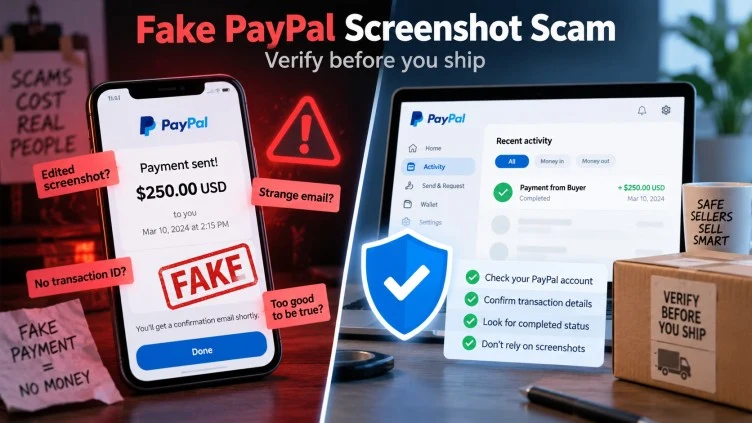
I find it useful to think about payment proof in terms of evidence quality.
A screenshot supplied by the buyer is buyer-controlled evidence. The person making the claim also provides the evidence supporting the claim.
An independently authenticated transaction in your own account is platform-controlled evidence. You access the payment provider separately and verify what its system records.
Those two forms of evidence deserve completely different weight.
The same principle applies beyond PayPal. Screenshots of bank transfers, cryptocurrency transactions, mobile-wallet payments, refund confirmations, shipping labels, and marketplace balances can all be misleading when viewed without independent verification.
Visual evidence can help you understand a situation. It should not override the underlying account record.
What About Pending PayPal Payments?
This is where balanced analysis becomes important.
Seeing a pending payment does not automatically indicate fraud. Legitimate transactions can have statuses or conditions that require attention, and payment services can apply reviews or holds depending on circumstances.
What matters is where you learned about that pending status.
If your own authenticated PayPal account shows a genuine transaction and clearly displays its status, you have something concrete to investigate.
If the only evidence that a “pending payment” exists is a buyer’s screenshot or an email they told you to check, the situation is fundamentally different.
Do not allow the word “pending” to become an explanation for a transaction that cannot be independently located.
The Courier Pickup Scenario
High-value marketplace sales often introduce another character: the courier.
A buyer claims they cannot collect the item personally but will send a courier, driver, cousin, employee, shipping agent, or moving company. None of those arrangements is automatically suspicious. Plenty of legitimate transactions involve third-party pickup.
The risk changes when pickup is combined with unverifiable payment.
Imagine that a buyer sends a screenshot showing $1,400 for a camera. Ten minutes later, a driver is supposedly outside your building. The buyer repeatedly says the payment has cleared and asks you not to delay the driver.
This creates physical urgency. Once the camera leaves your possession, recovery may become extremely difficult.
In that situation I would disregard the arriving driver entirely until the financial side is independently verified. A genuine buyer can wait while payment is checked.
The Freelancer Version
Physical sellers are not the only targets.
A freelancer may receive a screenshot claiming that payment for a logo, website, video edit, article, or consulting project has been sent. The client asks for the finished files immediately, perhaps explaining that PayPal is temporarily holding the payment.
Once editable source files, credentials, digital products, or completed work are delivered, recovering them is not always possible.
For digital work, keep project records and communications. PayPal notes that sellers responding to some disputes involving services or intangible goods may need evidence showing that the service was completed or digital access was provided.
The larger principle is the same: delivery should be based on verified transaction information, not screenshots.
Trust Indicators That Actually Matter
People naturally look for reassurance when dealing with a stranger. Unfortunately, scammers understand that instinct.
A profile with an old creation date can look reassuring. So can a professional photo, polite language, several marketplace reviews, or a convincing explanation about why somebody needs the item quickly. None should be treated as proof of payment.
Stronger trust indicators are transactional and independently verifiable.
The payment appears in your own PayPal account. The transaction details correspond to the agreed sale. The buyer does not object to reasonable verification. Shipping and delivery documentation can be retained. Communication stays within established channels whenever practical. There is no unexplained request for you to return money, buy gift cards, pay a courier, send cryptocurrency, or transfer money to “unlock” your funds.
Trust should grow from multiple consistent signals rather than a single impressive-looking screenshot. You can read more about CyberGhost VPN Review (2026).
What If the Screenshot Is Genuine but the Buyer Is Still Risky?
This is an overlooked issue.
Confirming that a screenshot corresponds to a real transaction only answers one question: whether a transaction exists.
It does not eliminate every other form of payment risk.
Transactions can still become disputed. Accounts can potentially be used without authorization. Seller Protection may have eligibility requirements. Shipping to a different address than the one shown in transaction details may create problems. Digital services require their own records.
That is why PayPal advises sellers dealing with unauthorized-transaction disputes to retain appropriate fulfillment and delivery evidence. For physical goods, that can include shipping and delivery documentation; for services and digital goods, it can include records demonstrating fulfillment.
So verification has two stages: first confirm the payment exists, then confirm you are fulfilling the transaction in a way consistent with the payment provider’s current protection requirements. You can read more about How Fake Receipts and Payment Alerts Trick Sellers.
What to Do If You Already Shipped the Item
If you realize after shipment that the payment screenshot may have been fake, speed matters.
Preserve the entire conversation before blocking anyone. Save the buyer’s profile information, screenshots, email messages, telephone numbers, shipping instructions, courier details, tracking numbers, and anything else associated with the transaction.
Contact the shipping company immediately if the package is still moving and ask whether interception or return-to-sender options are available. Whether this is possible depends on the carrier, shipping service, location, and delivery stage.
Check your PayPal account independently to determine whether any real transaction exists.
If a suspicious PayPal email or spoofed website was involved, PayPal says users can forward suspicious messages to phishing@paypal.com. If you believe your PayPal account itself was compromised, PayPal recommends reporting unauthorized activity and securing the account.
U.S. consumers can also report suspected fraud to the Federal Trade Commission at ReportFraud.ftc.gov. The FTC advises people who believe they sent money to a scammer to contact the payment company promptly and ask whether the transaction can be stopped or reversed.
Outside the United States, contact the appropriate local consumer-protection or cybercrime authority.
What to Do If You Clicked a Fake PayPal Link
A fake payment screenshot sometimes acts merely as the opening move. The attacker may eventually direct you to a fake PayPal login page.
If you entered your PayPal credentials on a suspicious website, treat the situation as an account-security issue rather than waiting to see what happens.
Access PayPal through the official app or a known legitimate address, change your password, review account activity, and make sure your security information has not been changed. If the same password was reused elsewhere, change it on those accounts as well. Enable strong account security features such as multi-factor authentication where available.
PayPal advises users who suspect account compromise to change their password and report suspicious or unauthorized activity.
Do not continue interacting with someone claiming they can “fix” the problem by remote access, receiving a verification code, or moving money elsewhere.
Why Smart People Still Fall for This
I dislike explanations that reduce scam victims to being careless. That does not accurately describe how many fraud attempts work.
A convincing scam often creates several small points of reassurance rather than one enormous lie.
The buyer behaves normally at first. They know the product details. They agree on the price. They provide their name. Then a payment screenshot appears. Then an email seems to confirm it. Then a courier is arranged. Each individual step makes the next one feel slightly more believable.
The victim may also have something psychologically invested in the transaction. They have been trying to sell an expensive item for weeks and finally found a buyer willing to pay the asking price.
That context matters.
Fraudsters frequently exploit momentum. Once someone mentally considers a sale completed, stopping everything to investigate an uncomfortable inconsistency becomes harder.
The safest response is to make verification automatic rather than emotional: no independently confirmed payment, no shipment.
A Simple Rule That Prevents Most Screenshot-Based Payment Scams
After researching this pattern, I keep returning to one rule:
Never treat an image of a payment as the payment itself.
That applies whether the screenshot arrives through Facebook Marketplace, Instagram, WhatsApp, Telegram, SMS, email, Craigslist, a freelance platform, or a direct message.
If someone genuinely sent money through PayPal, the transaction should ultimately be evaluated through PayPal — not through an image the sender controls.
This is also why screenshots should not be used as the deciding factor even when they look perfect. The more realistic fake interfaces become, the less useful visual inspection becomes as a security strategy.
Verification beats visual analysis.
Expert Risk Assessment: How Dangerous Are Fake PayPal Payment Screenshots?
Fake PayPal payment screenshots should be treated as a high-risk form of payment evidence, but receiving one does not automatically prove the sender is committing fraud.
There are legitimate reasons someone might send a screenshot. A buyer may simply be trying to show that they completed a transaction. Confusion about pending payments can also occur.
The situation becomes materially more concerning when the payment does not appear in the recipient’s account and the sender responds by applying pressure, producing additional off-platform “proof,” demanding immediate shipping, claiming an account upgrade is required, asking the seller to refund an overpayment, or instructing the recipient to contact unfamiliar support details.
Those behaviors are difficult to reconcile with normal payment verification.
The best defense is not trying to become an expert at identifying manipulated PayPal screenshots. Even experienced users can misjudge a polished image. Instead, remove the screenshot from the trust equation.
Open PayPal independently. Check the transaction yourself. Read the actual status and transaction details. Confirm that your fulfillment method is consistent with current seller-protection requirements. Keep shipping or service-delivery evidence. If anything conflicts with what the buyer is telling you, stop the transaction until the inconsistency is resolved through official channels.
For sellers, that may feel overly cautious when a buyer is waiting. In practice, it is simply basic payment verification.
A genuine screenshot can describe a payment.
Only the actual account can confirm what happened.
1 thought on “Fake PayPal Payment Screenshots: How the Scam Works and How to Verify a Payment”