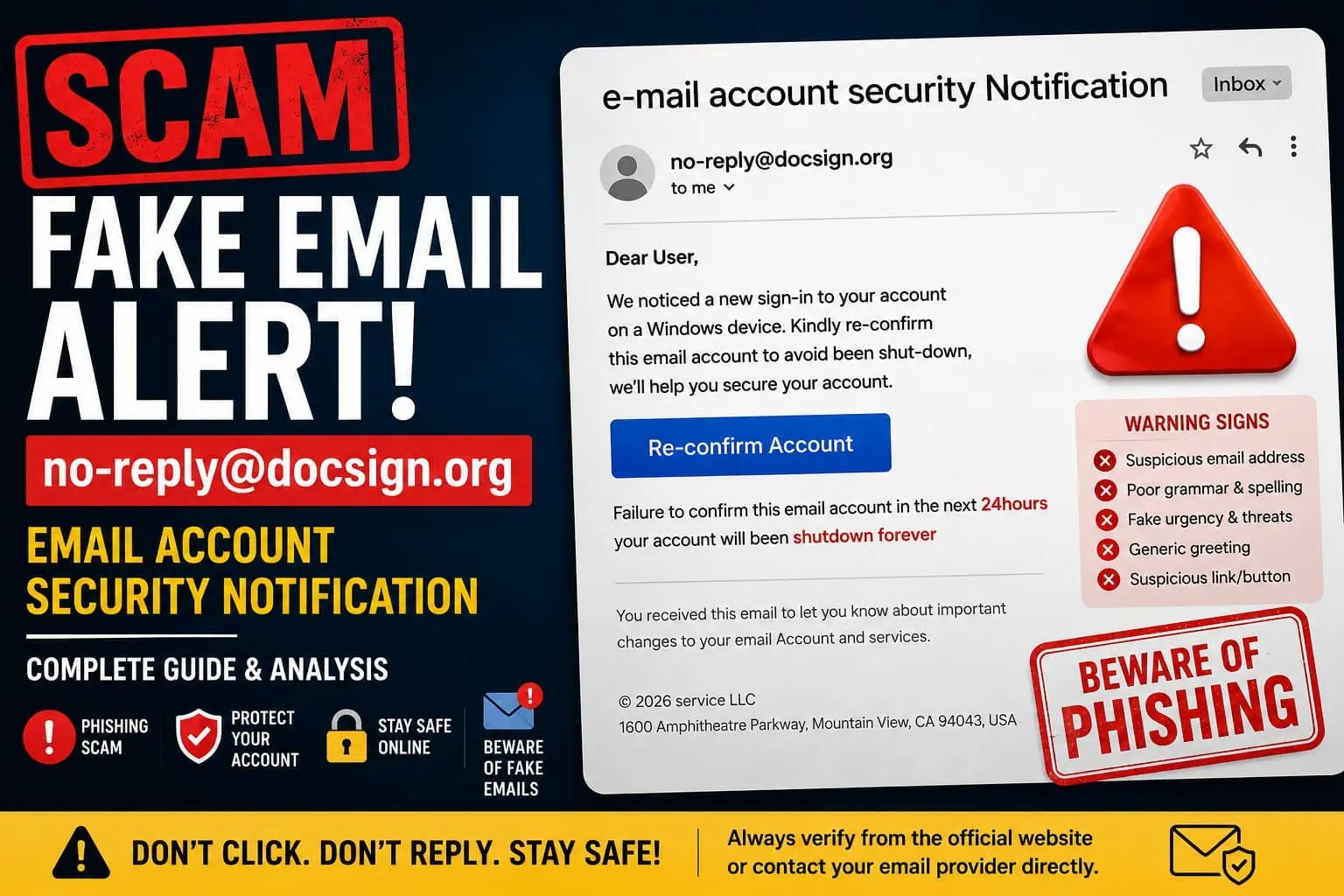
Many users are currently receiving suspicious “email account security” warnings from addresses such as no-reply@docsign.org. The message usually claims that your email account is about to be shut down unless you “re-confirm” your account within 24 hours.
After reviewing the email carefully, we found multiple red flags commonly associated with phishing scams.
Quick Verdict
| Investigation Result | Details |
|---|---|
| Final Verdict | SCAM / PHISHING EMAIL |
| Trust Score | 8/100 |
| Top Red Flag | Uses fake urgency to steal email login credentials |
| Recommended Action | Avoid and delete immediately |
Why We Investigated no-reply@docsign.org
We decided to investigate this email after several website owners reported receiving nearly identical messages in their spam folders. The emails targeted business email accounts connected to websites and hosting providers.
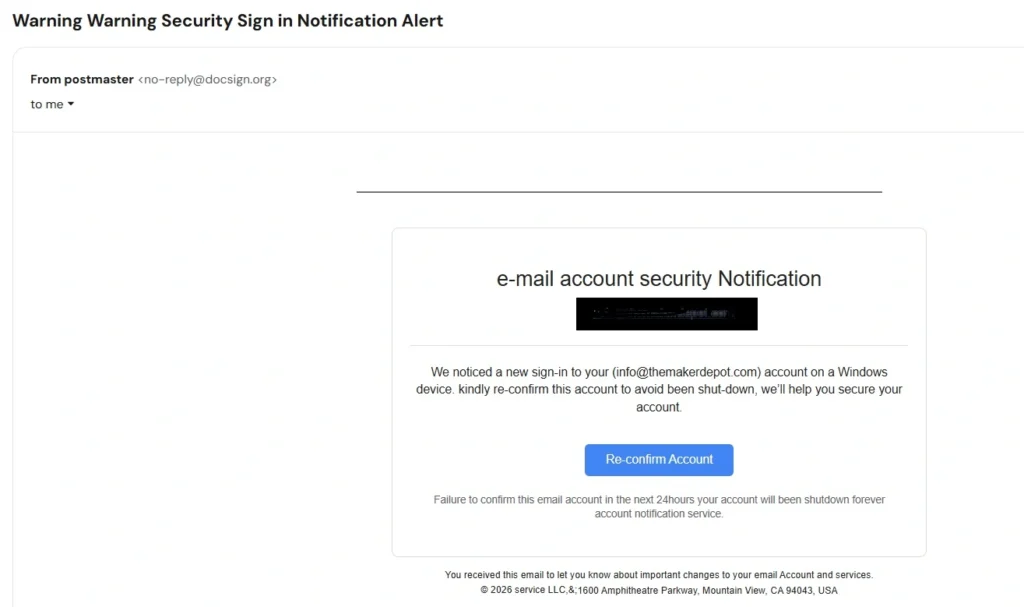
What immediately caught our attention was the aggressive warning language:
“Failure to confirm this email account in the next 24hours your account will been shutdown forever.”
This type of fear-based wording is commonly used by phishing scammers trying to pressure users into clicking malicious links without thinking carefully.
We also noticed that the email attempted to imitate a legitimate account security notification, even including a fake corporate footer with the famous Google address:
“1600 Amphitheatre Parkway, Mountain View, CA 94043”
This is a classic social engineering trick designed to make the email appear more trustworthy.
Technical Domain Audit
| Domain Investigation | Findings |
|---|---|
| Domain Mentioned | docsign.org |
| Email Type | Security notification phishing email |
| Main Goal | Credential theft |
| Hosting/Provider Claimed | Not clearly disclosed |
| Urgency Tactic Used | Yes |
| Spam Folder Detection | Yes in many cases |
Registration & Domain Analysis
During our review, we noticed that the sender domain does not appear connected to any major official email service provider. Legitimate account notifications are typically sent from verified domains belonging directly to companies like Google, Microsoft, Hostinger, Zoho, or other recognized email providers.
Instead, this message came from:
The domain itself immediately raises concerns because it attempts to sound corporate and trustworthy without clearly identifying an actual company.
Scam domains frequently use names that resemble:
- “doc”
- “sign”
- “secure”
- “verify”
- “mail”
- “account”
to trick users into believing the message is legitimate.
Another issue is the lack of proper brand identification anywhere inside the email.
Legitimate providers normally include:
- official company logos
- security references
- support pages
- account management links
- privacy information
This email lacked all of those professional elements.
Deep Dive Investigation
Company Transparency & Contact Details
One of the biggest warning signs is the complete lack of transparency.
The email never clearly identifies:
- the email provider
- the hosting company
- the company responsible for the warning
Instead, it uses generic phrases such as:
- “account notification service”
- “email account security notification”
This vague wording is extremely common in phishing campaigns because scammers want to target users from multiple providers at once.
The footer also appears suspiciously generic:
“© 2026 service LLC”
This tells users almost nothing about who actually sent the message.
Professional companies usually include:
- company registration details
- support contact information
- official branding
- verified support domains
None of that appeared here.
Fake Corporate Appearance
The scammers also inserted Google’s famous corporate address:
1600 Amphitheatre Parkway, Mountain View, CA
This is another manipulation tactic. Many phishing emails borrow addresses from well-known tech companies to appear legitimate.
However, simply mentioning Google’s address does not make the email genuine.
Content Originality Check
Another important thing we noticed was the poor writing quality throughout the email.
Examples include:
- “avoid been shut-down”
- “kindly re-confirm”
- “your account will been shutdown forever”
Legitimate security teams typically proofread their emails carefully because:
- spelling mistakes damage trust
- grammar errors look unprofessional
- major companies maintain strict communication standards
Phishing campaigns, on the other hand, often contain awkward wording because:
- they are mass-produced quickly
- many are translated poorly
- scammers prioritize urgency over professionalism
Expert Observation
One interesting pattern is that many phishing emails intentionally use slight grammar mistakes. Some cybersecurity researchers believe scammers do this to filter out cautious users and target only highly vulnerable recipients.
Regardless of the reason, poor grammar remains one of the biggest red flags in fake security emails.
Red Flags & Findings Table
| Red Flag | Why It Matters |
|---|---|
| Suspicious sender domain | Not linked to a known provider |
| Poor grammar | Common phishing indicator |
| Fake urgency | Designed to pressure victims |
| Threat of shutdown | Fear-based manipulation tactic |
| Generic wording | No clear company identity |
| Spam folder placement | Email providers already distrust it |
| Suspicious “Re-confirm Account” button | Likely phishing link |
| Fake corporate footer | Attempts to imitate legitimacy |
The Hidden Trap in This Email Scam
The most dangerous part of this scam is the fake verification process.
Most likely, the “Re-confirm Account” button redirects users to a phishing page designed to:
- steal email passwords
- capture login credentials
- access business accounts
- hijack website admin emails
Once attackers gain access to a business email account, they may:
- reset passwords for other services
- impersonate the business owner
- send spam emails
- target customers
- attempt financial fraud
For website owners, this can become extremely dangerous because email accounts are often connected to:
- hosting providers
- WordPress accounts
- payment systems
- social media profiles
- domain registrars
That is why phishing attacks targeting email accounts remain one of the most common cyber threats online today. Be aware, check How to Identify Fake Shopping Websites: An Investigative Guide for Smart Consumers.
Why These Scam Emails Work
Unfortunately, these scams succeed because they exploit fear and urgency.
Many users panic when they read:
- “your account will be shut down”
- “security warning”
- “unauthorized sign-in”
- “confirm immediately”
Scammers understand that people may react emotionally before checking:
- the sender domain
- grammar mistakes
- suspicious links
This is especially true for:
- small business owners
- website admins
- older users
- people managing multiple online accounts
How to Check If an Email Security Alert Is Legitimate
Before clicking any security email, always verify:
1. Check the Sender Domain
Legitimate alerts should come from official domains only.
Example:
Be cautious with strange variations.
2. Never Click Directly From the Email
Instead:
- open your browser manually
- visit the official provider website yourself
- log into your account directly
This avoids phishing traps.
3. Review Grammar & Formatting
Poor grammar and awkward wording remain one of the easiest ways to identify phishing emails.
4. Check Where the Email Landed
If the email automatically went to spam, your email provider likely detected suspicious behavior already.
That alone is not proof, but it is a strong warning sign.
Red Flag Checklist
Here are the biggest warning signs we found in this email:
- Suspicious sender address
- Fake account shutdown warning
- Pressure to act within 24 hours
- Poor grammar and spelling
- Generic company identity
- Spam folder placement
- Fake-looking corporate footer
- Unknown verification button
If multiple red flags appear together, users should avoid interacting with the email completely. if You got scammed, immediately report to FTC a government official site in USA.
Final Verdict: Is no-reply@docsign.org Trustworthy?
No, we do not consider this email trustworthy.
Based on our investigation, this appears to be a phishing attempt designed to scare users into clicking malicious links and entering their email credentials.
The combination of:
- fake urgency
- suspicious sender domain
- poor grammar
- generic wording
- and spam detection
strongly suggests that users should avoid interacting with the message.
Our recommendation is simple:
Delete the email immediately and never enter your credentials through links sent in suspicious security alerts.
Already Clicked the Link? Here’s What to Do
If you accidentally clicked the email or entered your password, take action immediately.
1. Change Your Password
Update your email password immediately using the official provider website.
2. Enable Two-Factor Authentication (2FA)
This adds an extra layer of protection to your account.
3. Review Login Activity
Check your account security panel for:
- unknown devices
- suspicious login locations
- unauthorized activity
4. Scan Your Device
Run a malware or antivirus scan to ensure nothing harmful was installed.
5. Contact Your Hosting or Email Provider
If the compromised email is linked to your business or website, notify your provider immediately.
6. Report the Scam
You can also report phishing emails to:
- FTC (United States)
- Action Fraud (UK)
- your email provider’s phishing reporting system
Reporting helps providers block future attacks and protect other users.
Final Thoughts
Phishing emails continue evolving every year, and fake “security notification” scams remain one of the most effective tricks used by cybercriminals.
The safest approach is simple:
- never panic
- verify manually
- avoid clicking suspicious links
- and trust your spam filter when something looks wrong.
A few extra seconds of caution can prevent serious account compromise later.